
Kinetic Pulse
  • Home
  • Services
  • Portfolio
  • Blog
  • Terms
  • Contact

Make selecting size attribute compulsory in ZenCart

July 7, 2010

I love Zencart most of the time – but its implementation of size/colours attributes always causes me headaches.
A common request is for the size to be compulsory when adding a product to the basket.

But the official Zen cart way of doing it involves a complex process of adding a dummy option to the top and forcing that to be default. Not a great way – especially as you can still end up with an item in the basket that has a size of “Please select…”

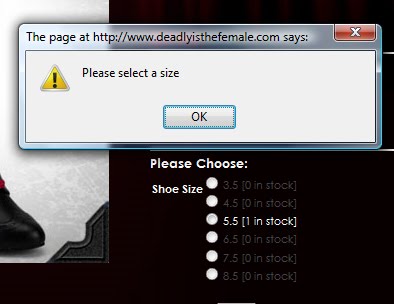
So I’ve written a quick n dirty javascript/jQuery function to check if the option has been chosen:

In the tpl_product_info_display.php template add the following javascript above the line that says

<?php echo zen_draw_form(‘cart_quantity’, zen_href_link(zen_get_info_page($_GET[‘products_id’]), zen_get_all_get_params(array(‘action’)) . ‘action=add_product’), ‘post’, ‘enctype=”multipart/form-data”‘) . “\n”; ?>
<script type=”javascript”>
var clickedOption  = false;
$(document).ready(function() {
    $(“input[name*=’id[1]’]”).click(function() {
        clickedOption  = true;
    });
});
function checkOptions(){
    if(clickedOption){       
        return true;
    }else{
        alert(“Please select a size”);
        return false;
    } 
}
</script>

Note: You will have to repeat the $(“input[name*=’id[1]’]”).click() function for as many possible attributes you have. (Calls for some sort of loop surely?!)

Then change the following line:

<?php echo zen_draw_form(‘cart_quantity’, zen_href_link(zen_get_info_page($_GET[‘products_id’]), zen_get_all_get_params(array(‘action’)) . ‘action=add_product’), ‘post’, ‘enctype=”multipart/form-data”‘) . “\n”; ?>

to

<?php echo zen_draw_form(‘cart_quantity’, zen_href_link(zen_get_info_page($_GET[‘products_id’]), zen_get_all_get_params(array(‘action’)) . ‘action=add_product’), ‘post’, ‘enctype=”multipart/form-data” onSubmit=”return checkOptions();”‘) . “\n”; ?>

So that it forces the checkOptions() function to run each time you try to add something to the cart

I admit this is very quick-and-dirty – and it only caters for 1 option at a time on the page.
And I know purists among you will bemoan the fact that this is just client side validation, and what if the visitor doesn’t use Javascript etc etc.
Well it works for me for for now.
Who knows maybe I’ll post an update with all these issues addressed? For now, enjoy!

Share

Facebook Google+ Twitter Pinterest Email

Back to Blog

Testimonials

Thank you guys so much for all that you’ve done helping us to create a really awesome website!! We get such great feedback – everyone loves it & we couldn’t be prouder! Look forward to working with you again soon!
Wild Thyme PlantsWild Thyme Plants
I like it.  I like it a lot !!!

 You have interpreted what I wanted to achieve perfectly considering what you have to play with i.e not redoing the whole thing in the process.

Fiona Simmons-MooreSouth Gloucestershire Parents & Carers
It’s been fab working with you – we love the site and certainly going to recommend you!
James DaviesThirty Eight Degrees North
Thanks so much for all your work on this, really appreciated. It’s come on in leaps and bounds since you took over.
Pete KewRedwood Strip Curtains
Absolutely fantastically professional web developer – I would highly recommend!!! Thank you so much Kinetic Pulse!
Tania MarstonDoris Designs
Amazing and brilliant, Kinetic Pulse have lifted a dream to reality, Highly recommended and great if you are total novice, they know their stuff…Thanks again
Annie LindridgeSalt Yourself Out
Thank you for all of your hard work its looks fab and I am over the moon with it!
Amanda MercerAmanda Mercer Ceramics

Copyright 2026 Kinetic Pulse