Kinetic Pulse
  • Home
  • Services
  • Portfolio
  • Blog
  • Terms
  • Contact

Easier deleting of multiple products in Magento

June 5, 2011

Anyone who has used Magento knows that deleting muliple products can be a slow & tiresome process – the “Delete All” function will often result in Server 500 errors if you have more than 100 products.
Up until now I have just bitten the bullet, put some good background music on and deleted the products a page at a time (inwardly cursing that Magento promises so much and delivers little)
But having to do lots of product imports I thought I’d investigate a better way of deleting.
I found this splendid blog post by Sonassi here:
http://www.sonassi.com/knowledge-base/magento-knowledge-base/mass-delete-products-in-magento

Which goes some way to showing how its done.
1) Basically I took their code and put it into a php file called “mass-delete.php“
2) I put this file in a subfolder in my magento site (“my-functions“) – for neatness
3) I edited my .htaccess so i coudl run functions from thsi folder – find teh other similar looking lines and add:

RewriteCond %{REQUEST_URI} !^/my-functions/

The php file also needs editing if you want it to run on ALL products. Just remove the line that says:

->addFieldToFilter('data_set', 1544);

Then you’re ready to run this in your browser:

http://www.yoursite.com/myfunctions/mass-delete.php 

Warnings:
1) This script does take a long time to run. Mine has caused Server 500 errors – but I’ve found its best just to re-refresh the page and it starts off where it left off
2) Whatever you do make sure you let teh script finish what its doing. Becasue at teh end of the script it switches the inedex types back to Update on Save (as it turns  it to Manual at the start) which wil mean your site behaves normally once again. (I didn’t and couldn’t see any of my products. Took me a while to realise I have to change the update types on my indexes manually)

I hope this helps anyone getting that Sonassi script to work for them
Share

Facebook Google+ Twitter Pinterest Email

Custom product type in Zen Cart – how to make it default

May 28, 2011

In a recent post I waxed lyrical about how great custom product types are in Zen Cart.
One thing that has bugged me though is the fact that when creating a new product you have to train the web site adminstrator to make sure they select the correct product type when first creating their product (otherwise its a painful process of having to edit the product_type value manually in the db backend to undo it…)

So here is how to make your new product type the default one that gets created:
1) Edit the following file: \admin\includes\modules\category_product_listing.php
2) Locate the line:

echo '  ' . zen_draw_pull_down_menu('product_type', $product_restrict_types_array);

and comment it out by putting // at the start of the line

3) Add the following next to the other lines contain the html for hidden inputs:

<input name="product_type" type="hidden" value="X" />

where X is the type_id of your new product type as added in the
product_types table

Et voila. The dropdown no longer appear in the Product listing page in the admin and when the user clicks on the New Product button the product type is automaticlly your custom one.
Hurrah

Share

Facebook Google+ Twitter Pinterest Email

Create a script for Photoshop to save layers as separate jpgs

May 26, 2011

Ahh creating product images for clients ecommerce sites – dontcha just love it?
Usually I insist that the client or the designer provide all product images in a uniform size with a suitable naming convention, but in my madness on this current project I said I would do the photo cropping/tweaking.
The client sends me a random set of product shots in a variety of sizes & orientations.
So in Photoshop I create a standard size PSD and drag and drop and move these motley collection of pictures around until I have a multi layer PSD with all the layers nicely named for the products they represent.
Surely there must be a “Save Layers as JPGS” option in Photoshop?
Alas no – so I had to learn how to script in Photoshop!

I found this very useful post here:
http://ask.metafilter.com/4903/Is-it-possible-to-batch-process-layers-in-Photoshop

On which I based my findings.
After installing the Scripts plugin (see previous article for link) I wrote the following javascript script to save off each layer as a separate JPG file.

try
{
var docRef = activeDocument;
var filename = docRef.name;
var nameParts = filename.split(".psd");
var nameRoot = nameParts[0];
var counter = 0;
for (var i = 0; i < docRef.layers.length; i++){
if (docRef.artLayers[i].visible){
docRef.activeLayer = docRef.layers[i]
docRef.layers[i].copy();
var docRef2 = documents.add(docRef.width,docRef.height,docRef.resolution,docRef.activeLayer.name);
docRef2.paste();
docRef2.artLayers[1].remove();

jpgFile = new File( docRef.path+"/"+docRef.activeLayer.name+".jpg" );
jpgSaveOptions = new JPEGSaveOptions();
jpgSaveOptions.embedColorProfile = true;
jpgSaveOptions.formatOptions = FormatOptions.STANDARDBASELINE;
jpgSaveOptions.matte = MatteType.NONE;
jpgSaveOptions.quality = 1;
activeDocument.saveAs(jpgFile, jpgSaveOptions, true,
Extension.LOWERCASE);

saveFile = saveOptions = null;
docRef2.close(SaveOptions.DONOTSAVECHANGES);
counter++;
}
}

docRef.selection.deselect();
docRef = null
docRef2 = null

}
catch(someError)
{
alert( "JavaScript error occured. Message = " + someError );
}

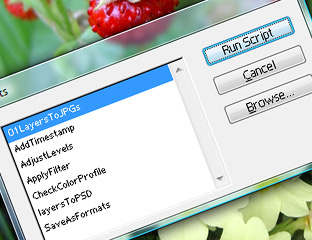
I saved this as “01LayersToJPGs.js” in the Photoshop \ Presets \ Scripts subdirectory.

So now if I have my multi layer PSD open and run this script (File > Automate > Scripts) It will whirr away and save each image off as a separate jpg.
A nice unexpected touch is that it saves the image dead center within a blank white background – which certianly helped making some of the tiny images look better!
As usual I’d love your feedback on this!
(BTW I’m only using Photoshop 7 – there may well be a way of doing this automatically in later versions of Photoshop!)

Share

Facebook Google+ Twitter Pinterest Email

Useful crontabs for backups & scheduled emails

May 11, 2011

I thought I would document how I got the following scheduled jobs working on my clients RapidHosts hosting. It involved a lot of trial & error to get them going so thought I should share them. (Note: You’ll obviously need to change the web directory, back up folders & db credentials to suit your setup)

The following runs a MySQL DB backup and stores it as a date stamped gzip file

/usr/bin/mysqldump -u username dbname -ppassword |gzip> /var/www/vhosts/yoursite.co.uk/httpsdocs/backups/BACKUP.`date +”\%Y-\%m-\%d”`.gz

The following runs a full file backup and stores it as a date stamped tar file
tar -cvpzf /var/www/vhosts/yoursite.co.uk/httpsdocs/backups/`date +”\%Y-\%m-\%d”`.tar /var/www/vhosts/yoursite.co.uk/httpdocs/

The following runs a scheduled email reminder to customers

/usr/bin/php -q /var/www/vhosts/yoursite.co.uk/httpdocs/sendEmail.php
(sendEmail.php is the php file that contains the email logic)

As far as schedules go I have the first two running as a weekly job running on Sundays – whereas the reminder email is going out daily.

Obviously let me know if you can find a better way of doing this!

Share

Facebook Google+ Twitter Pinterest Email

Use CSS to make a div the maximum height of the window

April 21, 2011

I’ve often struggled to make a div that fits the maximum height of the current browser window (without resorting to harcoding a height in pixels) And putting height:100% on the divs stylings appears to do nothing.

Then I stumbled across a post which tells me how to do it:


html {
height : 100%;
}
body {
height : 100%;
}
#yourDiv {
height : 100%;
}

(obviously #yourDiv being the id or class of the div your working with)

Woo hoo – one happy bunny here!
Thanks to  http://forum.boagworld.com/discussion/1556/maximize-a-div-to-the-windows-height/p1

Share

Facebook Google+ Twitter Pinterest Email
  • Newer
  • 1
  • …
  • 6
  • 7
  • 8
  • 9
  • 10
  • …
  • 16
  • Older

Testimonials

Thank you for all of your hard work its looks fab and I am over the moon with it!
Amanda MercerAmanda Mercer Ceramics
Amazing and brilliant, Kinetic Pulse have lifted a dream to reality, Highly recommended and great if you are total novice, they know their stuff…Thanks again
Annie LindridgeSalt Yourself Out
I like it.  I like it a lot !!!

 You have interpreted what I wanted to achieve perfectly considering what you have to play with i.e not redoing the whole thing in the process.

Fiona Simmons-MooreSouth Gloucestershire Parents & Carers
Thank you guys so much for all that you’ve done helping us to create a really awesome website!! We get such great feedback – everyone loves it & we couldn’t be prouder! Look forward to working with you again soon!
Wild Thyme PlantsWild Thyme Plants
Thanks so much for all your work on this, really appreciated. It’s come on in leaps and bounds since you took over.
Pete KewRedwood Strip Curtains
Absolutely fantastically professional web developer – I would highly recommend!!! Thank you so much Kinetic Pulse!
Tania MarstonDoris Designs
It’s been fab working with you – we love the site and certainly going to recommend you!
James DaviesThirty Eight Degrees North

Copyright 2026 Kinetic Pulse