Kinetic Pulse
  • Home
  • Services
  • Portfolio
  • Blog
  • Terms
  • Contact

Add slideshow to Squarespace using Jquery

June 14, 2010

[PLEASE NOTE: This post relates to an old version of Squarespace – version 5 and previous. Things have moved around in version 6 so this post will not help v6 users, I’m afraid]

I was asked by a client to add a simple fading slideshow animation to their Squarespace website:
This works best for images that are all the same size that just need to fade into one another. Make sure the images are not too hi res as there is no prelaoding code in here – so users may experience a delay as each picture loads
Take a look at  the site so you can see the slideshow in action

http://abbeyfurnitureonline.squarespace.com/

The code works by animating the opacity of the top image in a stck of absolutely positioned images – then changing the z-index once it has finished working with an image.
Here’s how I did it.

Login to Squarespace.
Goto Squaresace Configuration > Website Settings > Code Injection
Add the following code to the Extra header code region:

<script type="text/javascript" src="http://code.jquery.com/jquery-1.4.2.min.js"></script>
<script type="text/javascript" >
function slideSwitch() {
    var $active = jQuery('#slideshow span.active');

    if ( $active.length == 0 ) $active = jQuery('#slideshow span:last');

    var $next =  $active.next().length ? $active.next()
        : jQuery('#slideshow span:first');

    $active.addClass('last-active');

    $next.css({opacity: 0.0})
        .addClass('active')
        .animate({opacity: 1.0}, 1000, function() {
   $active.removeClass('active last-active');
        });
}
</script>
<script type="text/javascript">

jQuery(document).ready(function(){

 setInterval( "slideSwitch()", 4000 ); 


 });
 
</script>

Note the 4000 is the speed of the transitions – larger number menas slower transitions

Now in the page you want your slideshow to be add the following code (choose RAW HTML editor)

<div id="slideshow">
 <span id="slideshow1" class="slideshowImg active"> 
  <img src="/storage/home-page/laura-Cornet.jpg?__SQUARESPACE_CACHEVERSION=1276508434386" alt="" />
 </span> 
 <span id="slideshow2" class="slideshowImg"> 
  <img src="/storage/home-page/laura-Stained-Glass.jpg?__SQUARESPACE_CACHEVERSION=1276508416522" alt="" />
 </span> 
 <span id="slideshow3" class="slideshowImg"> 
  <img src="/storage/home-page/Laura-Photo-Frame.jpg?__SQUARESPACE_CACHEVERSION=1276508404271" alt="" />
 </span> 
 <span id="slideshow4" class="slideshowImg"> 
  <img src="/storage/home-page/Laura-mirror-sign.jpg?__SQUARESPACE_CACHEVERSION=1276508386699" alt="" />
</span> 
<span id="slideshow5" class="slideshowImg"> 
  <img src="/storage/home-page/Laura-Buddha-on-wall.jpg?__SQUARESPACE_CACHEVERSION=1276508364291" alt="" />
 </span>
</div>

You will then need the following in your Custom CSS file

Navigate to Appearance Editor > Custom CSS – and somewhere near the bottom (so you can find it again) add the following:

#slideshow {
    position:relative;
    height:448px; /* modify this to suit the height of your pics */
    text-align:center;
}

#slideshow span.slideshowImg {
    position:absolute;
    top:0;
    left:0px;
    z-index:8;
}
#slideshow span.slideshowImg img {
    display:none;
}
#slideshow span.slideshowImg.active {
    z-index:10;
}
#slideshow span.slideshowImg.active img {
    display:block;
}
#slideshow span.slideshowImg.last-active {
    z-index:9;

You should be able to reuse the slideswitch function on many pages with different images.
Although note that in the current set up they all need to be the same size of images – but this could easily be changed by using inline styles for diffrent slideshow divs.

I hope you enjoy this! Any feedback appreciated

Share

Facebook Google+ Twitter Pinterest Email

Beware the one-click install for WordPress

May 21, 2010

I love WordPress most of the time. It simple, has an extremely customisable front end, a lovely intuitive admin interface that almost all clients can get to grips with easily – oh and its free!

So I have built many a site with it – some simple, some complicated – always to great effect and general client satisfaction. Go me!

I had been recommended a new hosting provider that a client of mine had been using and their rates seemed very reasonable for just a small WordPress blogging site. So I took the plunge and signed up with them. Plus they had Fantastico one-click installs available for most of major packages – WordPress included.

So rather than me faff around and create a MySql db, then feed the data into the WordPress install screen after I had uploaded all the install files etc, I could just click once on the Fantastico icon and – ta da – one minute later I’m looking at my shiny new blog!.

So far so easy. WordPress theme built – designer happy, client happy – I got paid.

So how come 2 months after launch the site is not being found on any Google/Bing/Yahoo searches? Absolutely no search engine traffic is showing up in Google Analytics. Its not as if the clients site is very niche either – and yes it has been SEO-ed up the ying yang before you point the finger at moi!

I started to worry – “Maybe Google has blacklisted this site because I used text-indent:-9999px too many times??”

Then I found the answer:

http://www.wordpressmax.com/wordpress-news/new-wordpress-blog-privacy-settings

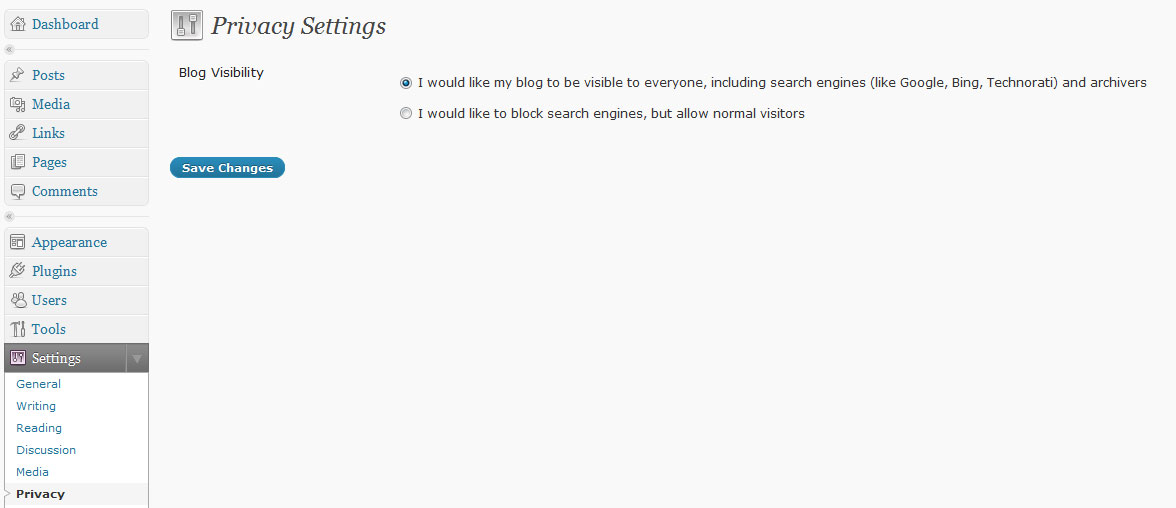
In this article Jeff mentions that by default in one-click installs WordPress is set to be hidden from search engines unless you explicitly go and switch the setting to “Allow search engines” – I couldn’t believe it! WordPress seemed to be deliberately sabotaging my attempts to let people find my site!

Arrgh! Now I just need to grovel to my client and give her a bit of free consultancy to make up for the fact that she had just ten visitors for the past two months…. wish me luck

Update:
Just as a warning, its not as easy as just flicking the switch and suddenly your site is listed on Google.
After 2 days it still wasn’t showing so here’s what I did. Maybe it was one , or a combination of things that worked – who knows?
1) Changed the Published date of all the pages in the site (I know this might not be feasible in a large blog but this site only has 6 or 7 static pages)
2) Submitted (and resubmitted) a sitemap to Google (via Google Webmaster tools)
3) Used the links I found on this (realy useful) site to resubmit my site to Google : http://www.feedthebot.com/

I’m not sure which one worked but a day or so after I played with these the site started showing up in Google results – phewee!

Share

Facebook Google+ Twitter Pinterest Email

$_POST Variables for Image input buttons

April 14, 2010

I’ve just run up against something weird.
My PHP code which was detecting which of two buttons a user had clicked on a form had suddenly stopped working. Or to be exact, had stopped working in Internet Explorer.
I was using the $_POST variable of the button name to detect if it had been clicked.
For example the two buttons were called “Register” and “Subscribe” – so if I wanted to see if the Subscribe button had been clicked I would perform the following check in the submit process:

if($_POST['btnSubscribe']!=""){
//echo "add subscription to basket;
}

where ‘btnSubscribe’ was the name of the input

Which all worked fine until I changed the input type form a button to an image.
Now I get these extra $_POST variables:
$_POST[‘btnSubscribe_x’] and $_POST[‘btnSubscribe_y’] and most weird of all I only get the $_POST[‘btnSubscribe’] variable in Firefox (and I’m guessing in other “normal” browsers like Safari, Chrome etc)
But in Microsoft’s odd ball of a browser, Interent Explorer 7 and 8, it is no longer there!!
Which is what was breaking my code! And it took me ages to track down, so I’m sharing it with you. I’ve now changed my submit code to detect the presence of  $_POST[‘btnSubscribe_x’].

Lesson learnt: Use images for buttons from Day 1 so you know to code round their quirks – rather than leave it till the 11th hour

Share

Facebook Google+ Twitter Pinterest Email

Remove all products and categories from a Zen Cart

April 14, 2010

Don’t you just hate it when you realise you need to clear out all your old products and categories froma ZenCart install and start again? Particularly if you have done an import using EasyPopulate and the client(ahem) has given you a spreadsheet of duff data?!

Simply login to phpMyAdmin and run these statements on your database.
WARNING: This will delete ALL your product data!

DELETE FROM zen_customers;
DELETE FROM zen_customers_info;
DELETE FROM categories;
DELETE FROM categories_description;
DELETE FROM group_pricing;
DELETE FROM manufacturers;
DELETE FROM manufacturers_info;
DELETE FROM products;
DELETE FROM products_attributes;
DELETE FROM products_attributes_download;
DELETE FROM products_description;
DELETE FROM products_discount_quantity;
DELETE FROM products_options;
DELETE FROM products_options_values;
DELETE FROM products_options_values_to_products_options;
DELETE FROM products_to_categories;

Share

Facebook Google+ Twitter Pinterest Email

Painful PNGs

February 20, 2010

So my latest website I’m building is a portfolio site for a makeup artist. Cue lots of lovely photos of beautiful models in lovely frocks etc. I promised the designer we could do a slideshow of images behind a custom “scrolly” frame, thinking I’d use CSS absolute positioning to layer the transparent PNG frame over the top of the portfolio jpegs (incidentally being animated using jQuery)
However there have been a few problems with this approach:
The initial solution was to use a png image for the frame – but this appeared a slightly different colour on both IE7 and Safari (but only on the Mac) but fine on all other browsers. This different colour was only a few shades darker but made it stand out against the background colour of the page.

So I ditched the idea of pngs and changed to transparent gifs for the frame.
But this caused even more problems. Gifs don’t take well to being sliced in directions other than horizontal or vertical – they leave horrid jagged pixelly edges. So I had to make an artistic decision (me – a developer too!) to ditch the funky asymetrical hole the designer had wanted to use a more square shape for the frame hole. Which worked for me.

No – designer not happy, so I went back to drawing board to see if I could find the source of the problem with the original Pngs.

The Problem with Pngs is that every browser and platform tries to interpret them differently.
I learnt this from the excellent article here:
http://morris-photographics.com/photoshop/articles/png-gamma.html

Basically when I was doing a “Save For Web…” from Photoshop it was adding in lots of extra info that was making the browsers think too much about how to display that PNG

The solution was to use a command utility called “PNGCrush” which allows you to remove the extra information – which should hopefully allow the processed png to appear more consistently across most browsers (note: I don’t guarantee it will work for you!)
The source code for PNGCrush can be found here:
http://sourceforge.net/projects/pmt/files/pngcrush/00-1.7.7/pngcrush-1.7.7.zip/download

For people (like me) who don’t know one end of a compiler from another you can download the Windows executable here (albeit a later version):
http://wareseeker.com/download/pngcrush-1.6.4.rar/356317

The moneyshot command you need to execute is:
pngcrush -rem cHRM -rem gAMA -rem iCCP -rem sRGB infile.png outfile.png

You can see the results in the (still work-in-progress) website here: www.bGorgeousMakeup.com

Share

Facebook Google+ Twitter Pinterest Email
  • Newer
  • 1
  • …
  • 11
  • 12
  • 13
  • 14
  • 15
  • 16
  • Older

Testimonials

Thanks so much for all your work on this, really appreciated. It’s come on in leaps and bounds since you took over.
Pete KewRedwood Strip Curtains
Amazing and brilliant, Kinetic Pulse have lifted a dream to reality, Highly recommended and great if you are total novice, they know their stuff…Thanks again
Annie LindridgeSalt Yourself Out
Thank you for all of your hard work its looks fab and I am over the moon with it!
Amanda MercerAmanda Mercer Ceramics
I like it.  I like it a lot !!!

 You have interpreted what I wanted to achieve perfectly considering what you have to play with i.e not redoing the whole thing in the process.

Fiona Simmons-MooreSouth Gloucestershire Parents & Carers
Absolutely fantastically professional web developer – I would highly recommend!!! Thank you so much Kinetic Pulse!
Tania MarstonDoris Designs
It’s been fab working with you – we love the site and certainly going to recommend you!
James DaviesThirty Eight Degrees North
Thank you guys so much for all that you’ve done helping us to create a really awesome website!! We get such great feedback – everyone loves it & we couldn’t be prouder! Look forward to working with you again soon!
Wild Thyme PlantsWild Thyme Plants

Copyright 2026 Kinetic Pulse